
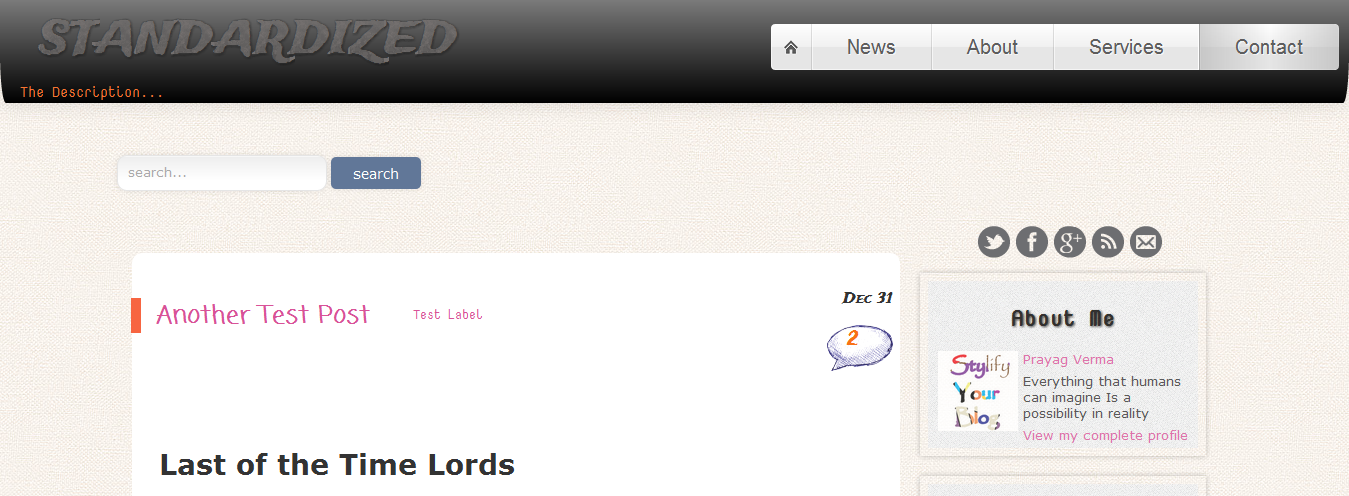
 Its been nearly 3 months since the Stylify template. Now I am presenting my second template named Standardized. It has its roots in responsive design and has some awesome features like threaded Reply comment & eye-catching Header design. A mix of design and usability.
See Demo
Download

Initially I started making this template with the goal to make it W3C valid. Thats where the name Standardized came from, the one that follows standards. Near the end of process I hit a really nasty cross-browser issue (a.k.a. IE sucks) , and by just 1 error this template remained from obtaining that "VALID" markup title. This is just version 1 and better onces are to come. The highlight of this template is the Nested Reply comment feature inside the Blogger comment system itself! A really amazing hack...
Features
-Responsive design (No horizontal scrollbar till 580px)
-Cross browser compatibility
-Page Navigation
-Widgets ready sidebar
-Its own Related Post widget
-Stylish commenting system with comments having gradient background style
-Attractive Post Title
-jQuery and CSS3 powered Header design
-Four column footer
-Threaded Reply feature for Blogger Comment system
-Eye-catching Sidebar Design
-Search Engine Optimized
-Near W3C Valid
-90%+ Google Page Speed score
How to configure some of the Features:
1.Menu
The code for the menu widget has been separately included in the Download Package. Rather than integrating it into the Template and making it difficult to edit ,I have included it separately. All the styles are included beforehand just the Links have to be copied in. The menu should be in the section of the Header (being just below the Header).
2.Page Navigation
To change the number of posts to be shown on using pagination find the term postperpage ( Using CTRL+F ) ,There will be a script something like this
<script type='text/javascript'> var home_page="/"; var urlactivepage=location.href; var postperpage=3; var numshowpage=6; var upPageWord ='Previous'; var downPageWord ='Next'; </script>
You can change the number values as you like in the above code.
var postperpage=9; → Changes the no of posts that will show up on clicking any page number.
var numshowpage=3;→ Changes the number of linking to show in the widget

Note: Make sure that you also set the value of Number of Posts on Main Page (Go to Design > Page Elements , Click on Edit option of Blog Post and then Number of posts on main page: ) to same as that of the postperpage value.
3.Enabling Reply option for the comments
The the reply option in the comment will have to enabled . Just search for the term blogid= ( using CTRL+F ) with "Expand Widget Preview" option ticked. Below it you will see "blogID=XXXXXXXXXXXX" replace this XXXXXXXXXXX number with your Blog's ID. [To find your Blog's ID just Open Design Tab and in the Address bar of your browser there will be a very long number , just paste that here]
4.Social Media Buttons and Search Box
The Download package also contains code for these two widgets. Either you can put them in separate widgets or put them together. In case you put them together then make sure the search box is above the icons and also include it in the section just below the Header (In Page Elements/Layouts). The widget containing the Social Media Icon should always be in this section.
This template came in the wake of many users complaining about different problems in the previous template.
Liked My Work ?
 Find me on
Cool blogger templates.. ^_^
@Danialde4Thanks for the compliments
wow..
very cool template dude..
so nice... elegant ;)
@Ф дфѕдғфдғ ФI am happy you liked it :) , the credit for the Nested Reply comment goes to you
@10 Hal Menarik Dunia Kita - Arham VhyThanks :)
@SOFTECHNOGEEKThanks for the compliment :)
Cool template :) Thanks for the share.. :) You rock..
@iTechColumnI am glad you liked it
Nice change ! i like your header animation :-)
@AmazingThingsThanks :) ,but the credit for the Animation goes to Codrops
Really great template bro
@SomeoneThanks :)
@Prayag Verma wowww thank's dude eheh.
Hi,
great template.
but I have problem with the page navigation. I follow your instrunctions but still having the problem. Could you please check? http://tsigaroprosfores.blogspot.com
@DARBefore anything firstly to remove the undefined undefined thing in the post, go to Settings > Formatting > Timestamp format , change it to this type Tuesday,January 10,2012
Do this and then try the page navigation widget, let me know if it works or not
Thanks,
I made the change, but the problem with the navigation remains :(
@DARJust for confirmation ,what is the value of number of posts on main page in the Blog Posts widget present in Page Elements
4
@DAR
Okay try this, Go to Edit HTML of your blog, in the beginning you will see the following code:
<meta content='text/html; charset=UTF-8' http-equiv='Content-Type'/>
<script type='text/javascript'>(function() { var a=window;function c(b){this.t={};this.tick=function(b,i,d){d=void 0!=d?d:(new Date).getTime();this.t[b]=[d,i]};this.tick("start",null,b)}var f=new c;a.jstiming={Timer:c,load:f};try{var g=null;a.chrome&&a.chrome.csi&&(g=Math.floor(a.chrome.csi().pageT));null==g&&a.gtbExternal&&(g=a.gtbExternal.pageT());null==g&&a.external&&(g=a.external.pageT);g&&(a.jstiming.pt=g)}catch(h){};a.tickAboveFold=function(b){var e=0;if(b.offsetParent){do e =b.offsetTop;while(b=b.offsetParent)}b=e;750>=b&&a.jstiming.load.tick("aft")};var j=!1;function k(){j||(j=!0,a.jstiming.load.tick("firstScrollTime"))}a.addEventListener?a.addEventListener("scroll",k,!1):a…
It doesn't work. I'm sure that I made something wrong :(((
@DAROkay ,Try re-installing the template.
If it doesn't work even then, then I suggest waiting for a period of 1-2 days as most of your post are very recent. It is very unlikely but there may be a issue with the indexing.
I will take up this issue in the Blogger Forum
Ok, I'll wait.
thanks for your support
@DARI have posted the problem in the Blogger Forum ,you can check the thread Here
While checking your blog I found the way to access the 2nd page
When the 2nd page button is click it redirects to this URL
http://tsigaroprosfores.blogspot.com/search?updated-max=2012-01-09T22%3A28%3A00%2B02%3A00&max-results=4#PageNo=2
But in reality the 2nd page exists at this URL
http://tsigaroprosfores.blogspot.com/search?updated-max=2012-01-10T22%3A28%3A00%2B02%3A00&max-results=4#PageNo=2
This is really unique problem ,I suppose it is something to do lot of post being posted together. This problem is most probably at Blogger side and will be fixed automatically
Thats true.
I've changed the publish date of the posts and it works.
@DARThat's nice ,I am happy the problem is solved :)
How to paste code below header?
Download Link not working for me.. Mediafire isn't loading :(
Please give another link.
@Sam Sexy
Finally go it :)
Needed to download through proxy due to that STOP SOPA act.
wtf? I'm search part id not working
thanks but how to add mete tags
@sagarJust add the following code below the <head> tag
<meta content='YOUR BLOG DESCRIPTION' name='description'/>
<meta content='AUTHOR NAME' name='author'/>
Similarly you can add the keyword tag but it is now obsolete and not used by any major search engine
@rahul royThe search box I have put is the default one that is inbuilt in each Blogger blog. If you have to use a custom search engine in it , then you have to do minor changes in the code. Check this post for more Information
Prayag Bro, could you please tell me, how to add custom styles to the comments. As you have shown in http://www.stylifyyourblog.com/2012/02/threaded-comment-styles.html
Firstly you will have to follow this post on how to make these comments into the Official Threaded Comments. Then you can directly apply the styles from the post you mentioned.
In standardize template it shows some error check my blog's comments http://bloggertrickshut.blogspot.in/2012/02/pagination-in-blogger.html
Send the template via email, i will fix it for you
I checked your Testblog (http://standardizedv1.blogspot.com/)
on the W3c Validator and I got 17 errors and 6 warnings. did you make some changes?
Check this post about the W3C mess in Blogger
http://www.stylifyyourblog.com/2012/01/w3c-valid-blogger-blog-impossibility.html
And also that was without the Follower widget
Yeah sry, was reading not enough on your awesome site.
Thx for your great work, I'll test your template and rework it for my needs. I show you a link when its ready. ;)
hello friend I loved your templates so one thing I'm not getting the date and set up the numbers of comments I left this link where the problem any tips I hope this is their link http://imageshack.us/photo/my-images/826/bloggerqq.png/
Go to Settings > Formatting > Timestamp format , change it to this type Tuesday,January 10,2012 ( This is for Old Blogger Interface )
very cool template, but i have a problem,
it shows bloger navigation widget in right side, how can i remove this? i have tried but cant succeed.
also how to change blog title and description font and color and size?
The test blog URL ?
htto://idm-latest.co.cc
Admin please reply, my blog url is http://idm-latest.co.cc
or internet-download-manager-latest.blogspot.com
Just add the following CSS to your blog #Navbar1 {display:none !important;}
thanks a lot, it worked!
now please help me to change the blogger title font size and font itself? actually i want to reduce the font size and change its color.
thanks in advance
To change the Color and Size ,search for .letter-container h1 span
and in this you will see the following
.....
font-size: 35px;
-ms-filter: "progid:DXImageTransform.Microsoft.Alpha(Opacity=90)";
filter: alpha(opacity=90);
color: green;
......
change the font-size and color attribute according to your needs
For changing the Font search for .letter-container h1
you will see the following code:
....
font-family: 'Trade Winds', Arial, sans-serif;
font-weight: 700;
......
Change Trade Winds with some other font, the blog has the following fonts
Architects Daughter
Coming Soon
Nova Mono
wao! thanks a lot for ur help. i love you :P
Please Help me in Page navigation
i thing this nice post
What problem are you exactly facing ? Please be a bit more specific
http://premium4coder.blogspot.com/
When i publish some post 3 post display and other post can not be shown
-------------------------------------------------------------------------
i follow instruction
var postperpage=12;
var numshowpage=7;
------------------------------------------------------------------------
and chahe this at post on main page 12
please help me
I checked your blog and found that the image of the FileFactory post (that is not displaying ) is a Base64 image. It is a known issue that Base64 causes Auto-Pagination in Blogger. Replace the FieFactory and Uploaded post images (of Base64 type )with Image URLs below
http://3.bp.blogspot.com/-jAk9iDSO4Rk/T2bMrguS1II/AAAAAAAADac/umqi2Q8SJUI/s1600/ff.png
http://3.bp.blogspot.com/-NrcDb1Y5E-k/T2bMsTRR1wI/AAAAAAAADak/t1YJq72YWDw/s1600/up.png
Thanks and i try
Can i use PNG Format image thanks
Yes , the above images are PNG formats ones
help me Please. How i add Read More Button to My Posts...
My Blog is about SEO Tips
Hi, before I upload you temp my blogger did not have navbar, after uploading now it has and could not be remove, there is no the code of that navbar to remove i have two trick oh how removing it but it could not work, please help
Your blog URL ? That way I can help you faster
i put it on the title
thank you
Just add the following CSS to your blog
#Navbar1 {display:none !important;}
How to apply Blogger Threaded Comments in here tothis template, because I still have a problem with that. The threaded comment isn't working properly on my blog. Any suggestion to fix this problem?
sorry for my bad English
Nice Template.. thanks 4 publish
I checked your blog , I suppose you have solved this issue now
Firstly check this post http://www.bloggeritems.com/2012/04/vinaluv-rulers-simply-threaded-comment.html , its the newer version of the Threaded Comments by Tien. I will do a tutorial about it soon
i have installed this template in my blog, its awesome.
But i have a question, may be it is not relevant but i am sure you will not get angry at me :)
I am installing a widget, which says paste a code before div id='main-wrapper' code, but i couldn't find that code in this template, is there any alternate code available? i have also asked this to that gadget owner, but he has not replied yet, that's why i decided to post here as well.
Thanks
http://premium-area.blogspot.com
Search for div class='content' instead
If you would tell about the widget , then I can help you more effectively
Yup :) thanks
Very Nice Blog thanks You For Template :)
Regards,
Blogger Widgets
it seems that u have implemented css button code in the template because whenever i try to put html button code it shows a button u have implemented, but i want to use custom button, so please guide me how can i remove that button code so that i can use my own. thanks
Another button code can also be inserted in place of the old one
The class button is attached to the CSS of the button
If you want to add another button then assign it another class ,like button1 and then in the HTML give it class="button1"
Thanks for reply,
i can't rename class name i want to add because its a css file and iam not author of this file, so it would be easy for me if i can rename your button class.
Are you there? i need reply for above query.
You can search for .button in the template and change every instance with .button2
thank u, i changed it.
is there any tutz to apply this http://bloggeritems.com/2012/06/slate-threaded-comment-system-for-blogger-blogspot.html , its new version of Threaded Comments,
Could you post tutz how to apply that in this template ?
sorry for my bad english
I messed up with the arrangements.. Pls help asap !
sekarspeaks.blogspot.in
Widgets are not showing up on the right.. instead one blow the other.. Initially the arrangements were right when i tried to change some it turned out like this.. http://sekarspeaks.blogspot.in
i am not able to install this template its showing error
http://governmentandpvtnaukri.blogspot.com/
in my blog following error is showing what should i do
We were unable to save your template.
Your template could not be parsed as it is not well-formed. Please make sure that all XML elements are closed properly. XML error message:
Content is not allowed in prolog.
http://governmentandpvtnaukri.blogspot.com/
Hello prayag
I used your template in http://nptechs.blogspot.com
I want to add auto read more but not working
can you plesae tell how to add auto read more to this template ???
Best theme ever....
wow, is nice template.
Write Search Engine Optimization Tips please.